
OMO — Omni Media Orchestrator
Why OMOProductsSolutionsResourcesPricingCompany
KADemo callSign inBook a demo
OMO — Omni Media Orchestrator

One voice.Four business workflows.Complete control.

Voice AI that turns every call into a completed business workflow and attaches a verifiable record to every outcome.

Plan your voice workflow Demo call

Direct contact

+995 32 205 45 61 Send an enquiry

Demo, implementation and technical integration from one contact point.

Products

  • Appointment booking
  • Outbound sales
  • Customer surveys
  • Voice menu

OMO

  • Why OMO
  • Human operator vs OMO
  • Solutions
  • Resources
  • Pricing
  • About us
  • Security

Help

  • Demo number
  • Frequently asked questions
  • Contact

Legal

  • All documents
  • Privacy
  • Terms
  • Cookie policy
  • Data processing
  • Acceptable use
  • Service levels
  • Accessibility

© 2026 OMO. All rights reserved.

PrivacyTermsAccessibility
Sign in to the app
HomeProductsBookings
01

Appointment and meeting booking

The agent understands the requested specialist, service, date, and time; checks live availability; offers alternatives; and creates a booking only after final confirmation.

Request a demo Phone demo
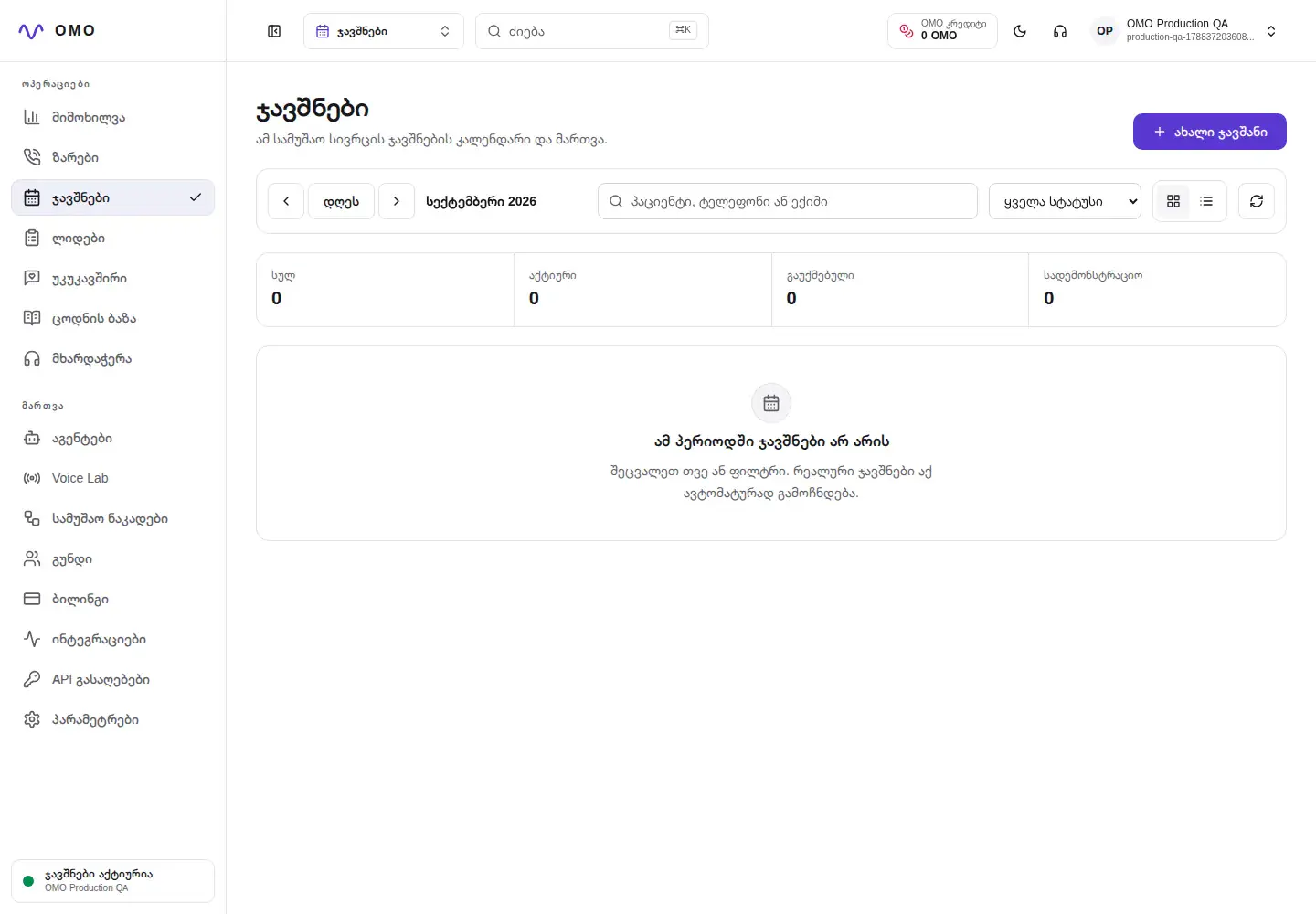
Bookings
Real OMO bookings calendar with demo data
Real OMO panel · Secure demo data

Who is it for?

For teams whose incoming calls must find genuine availability and create accurate calendar bookings.

Final outcome

A confirmed booking, the full conversation and a clear workflow history in one place.

What does it solve?

Problems that go beyond the call.

  1. 01

    Lost or missed calls during peak hours

  2. 02

    Offering unavailable times and risking double bookings

  3. 03

    Incorrect transfer of date, time, name and number

  4. 04

    Entering the same information multiple times

Conversation architecture

One call—from request to confirmed action.

  1. 01

    Understand the request

    Identify the service, doctor or specialist and the preferred date or time.

  2. 02

    Availability

    Check the live calendar and offer the nearest available alternatives.

  3. 03

    Patient data

    Collect the required information without repeating questions unnecessarily.

  4. 04

    Confirmation

    Summarize critical details and create one atomic booking after approval.

  5. 05

    Save the result

    A confirmed booking, the full conversation and a clear workflow history in one place.

Conversation example

Natural language with clear operational meaning.

Caller

I would like to book an appointment on Friday at 2:00 PM.

OMO

Friday 14:00 is free. In whose name should I register the visit?

The slot is held and awaiting final confirmation

Operator control

What the team manages in the dashboard

  • Daily, weekly and monthly calendar
  • A record of the patient, doctor, service and both phone numbers
  • Booking change, cancellation, statuses and related call opening
  • Import from Excel, export to Excel and unified calendar management

Reliable behavior

Guardrails that belong in every workflow

  • Free time is checked immediately before final confirmation
  • Bookings are created only after explicit confirmation
  • The change applies only to the field requested by the user
  • In case of uncertainty, the agent clarifies and does not invent data

Integration points

CalendarClinic or CRM APISIP numberWebhookImport from Excel and export to Excel

Where is it used?

One conversation script, tailored to your process.

01Clinics
02Beauty salons
03Service centers
04Consulting services

Frequently Asked Questions

Important answers before launch.

What happens if the requested time is unavailable?

The agent can suggest the nearest real alternatives from the calendar and only confirm the selected time.

Can I specify the day and time with one answer?

Yes. The workflow validates each value received in the same answer and does not repeat steps that are already complete.

Can an operator see the booking associated with a call?

From the booking detail, the associated session, transcript, audio and events can be opened if recording is enabled in the workspace.

Practical guides

Learn how this workflow works technically and operationally.

01What is the Georgian voice AI agent and how does it work?

Full explanation of Georgian voice AI agent: from telephony to speech recognition, process decision, actual action and audit trail.

02How automatic appointment booking by phone works

The right phone booking architecture: demand understanding, live calendar checking, alternatives, patient data and atomic confirmation.

03How a voice AI agent is tested before launching in a real environment

Voice AI quality plan: dialogue scenarios, audio, delay, conversation overlay, error recovery, action correctness and agent simulation.

04LiveKit and Pipecat: How telephony and conversation management are distributed

Roles of LiveKit SIP and Pipecat Flows in a voice AI system: media, real-time data flow, defined state, tool invocation, data storage, and scaling.

Other OMO products

One workspace, multiple voice workflows.

Outbound salesFrom campaign contact to a qualified lead and a clear next action.SurveysTurn a real conversation into a rating, reason and follow-up action.Voice menuInstead of buttons, say what you need.

Bookings — hear it in your real scenario

Tell us how your calls work today, and we will map the first voice workflow around your real requirements.

Request a demo +995 32 205 45 61